Flutter Card使用

【摘要】
效果:
代码:
Card(
elevation: 5,//阴影
shape: const RoundedRectangleBorder(//形状
...
效果:
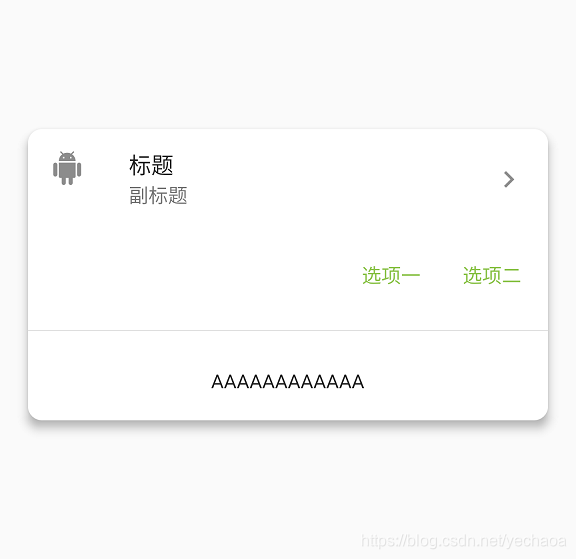
代码:
      Card(
        elevation: 5,//阴影
        shape: const RoundedRectangleBorder(//形状
          //修改圆角
          borderRadius: BorderRadius.all(Radius.circular(10)),
        ),
        color: Colors.white, //颜色
        margin: EdgeInsets.all(20), //margin
        child: Column(
          mainAxisSize: MainAxisSize.min,
          children: <Widget>[
            const ListTile(
              leading: Icon(Icons.android),
              title: Text('标题'),
              subtitle: Text('副标题'),
              trailing: Icon(Icons.chevron_right),
            ),
            ButtonTheme.bar(
              // make buttons use the appropriate styles for cards
              child: ButtonBar(
                children: <Widget>[
                  FlatButton(
                    child: const Text('选项一'),
                    onPressed: () {
                      /* ... */
                    },
                  ),
                  FlatButton(
                    child: const Text('选项二'),
                    onPressed: () {
                      /* ... */
                    },
                  ),
                ],
              ),
            ),
            Divider(),
            Padding(
              padding: EdgeInsets.all(20),
              child: Text("AAAAAAAAAAAA"),
            )
          ],
        ),
      ),
- 1
- 2
- 3
- 4
- 5
- 6
- 7
- 8
- 9
- 10
- 11
- 12
- 13
- 14
- 15
- 16
- 17
- 18
- 19
- 20
- 21
- 22
- 23
- 24
- 25
- 26
- 27
- 28
- 29
- 30
- 31
- 32
- 33
- 34
- 35
- 36
- 37
- 38
- 39
- 40
- 41
- 42
- 43
- 44
文章来源: blog.csdn.net,作者:yechaoa,版权归原作者所有,如需转载,请联系作者。
原文链接:blog.csdn.net/yechaoa/article/details/90483097

【版权声明】本文为华为云社区用户转载文章,如果您发现本社区中有涉嫌抄袭的内容,欢迎发送邮件进行举报,并提供相关证据,一经查实,本社区将立刻删除涉嫌侵权内容,举报邮箱:
cloudbbs@huaweicloud.com
- 点赞
- 收藏
- 关注作者
评论(0)