【愚公系列】2023年12月 HarmonyOS教学课程 047-Stage模型(开发卡片事件)

🏆 作者简介,愚公搬代码
🏆《头衔》:华为云特约编辑,华为云云享专家,华为开发者专家,华为产品云测专家,CSDN博客专家,CSDN商业化专家,阿里云专家博主,阿里云签约作者,腾讯云优秀博主,腾讯云内容共创官,掘金优秀博主,51CTO博客专家等。
🏆《近期荣誉》:2023年华为云十佳博主,2022年CSDN博客之星TOP2,2022年华为云十佳博主等。
🏆《博客内容》:.NET、Java、Python、Go、Node、前端、IOS、Android、鸿蒙、Linux、物联网、网络安全、大数据、人工智能、U3D游戏、小程序等相关领域知识。
🏆🎉欢迎 👍点赞✍评论⭐收藏
🚀一、开发卡片事件
HarmonyOS元服务卡片页面(Metaservice Card Page)是指在HarmonyOS系统中,用于展示元服务的页面界面。元服务是指一组提供特定功能或服务的组件,例如天气服务、音乐播放服务等。元服务卡片页面可以显示元服务的相关信息和操作选项,用户可以通过点击卡片页面上的按钮或交互元素来使用相关的元服务功能。元服务卡片页面提供了一种快速访问和使用元服务的方式,方便用户进行各种操作和任务。
🔎1.卡片事件能力说明
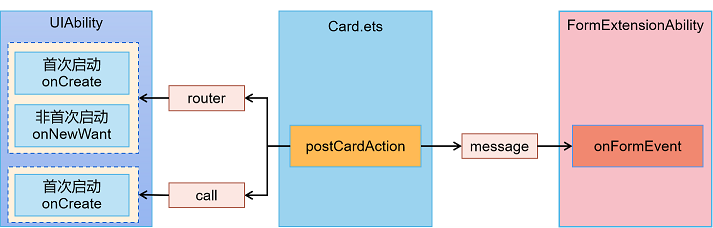
postCardAction()接口是ArkTS卡片中用于实现卡片内部和提供方应用间交互的方法。目前这个接口支持三种类型的事件:router、message和call,并且仅在卡片中可以调用。
-
router类型的事件可以用来执行页面跳转或路由切换的操作。通过指定目标路由和传递参数,可以实现页面之间的跳转或路由切换。 -
message类型的事件用于发送消息或通知给提供方应用。可以通过指定目标应用和消息内容,向提供方应用发送消息或通知。 -
call类型的事件用于调用提供方应用的函数或方法。可以通过指定目标应用、要调用的函数或方法名以及传递的参数,调用提供方应用中的函数或方法。
postCardAction()接口仅在卡片内部可以调用,无法在提供方应用中直接调用。这个接口提供了卡片和提供方应用之间进行交互的方式,可以实现卡片的功能扩展和与提供方应用的数据交互。
🔎2.使用router事件跳转到指定UIAbility
1、元服务界面
@Entry
@Component
struct WidgetCard {
  build() {
    Column() {
      Button('功能A')
        .margin('20%')
        .onClick(() => {
          console.info('Jump to EntryAbility funA');
          postCardAction(this, {
            'action': 'router',
            'abilityName': 'EntryAbility', // 只能跳转到当前应用下的UIAbility
            'params': {
              'targetPage': 'funA' // 在EntryAbility中处理这个信息
            }
          });
        })

      Button('功能B')
        .margin('20%')
        .onClick(() => {
          console.info('Jump to EntryAbility funB');
          postCardAction(this, {
            'action': 'router',
            'abilityName': 'EntryAbility', // 只能跳转到当前应用下的UIAbility
            'params': {
              'targetPage': 'funB' // 在EntryAbility中处理这个信息
            }
          });
        })
    }
    .width('100%')
    .height('100%')
  }
}
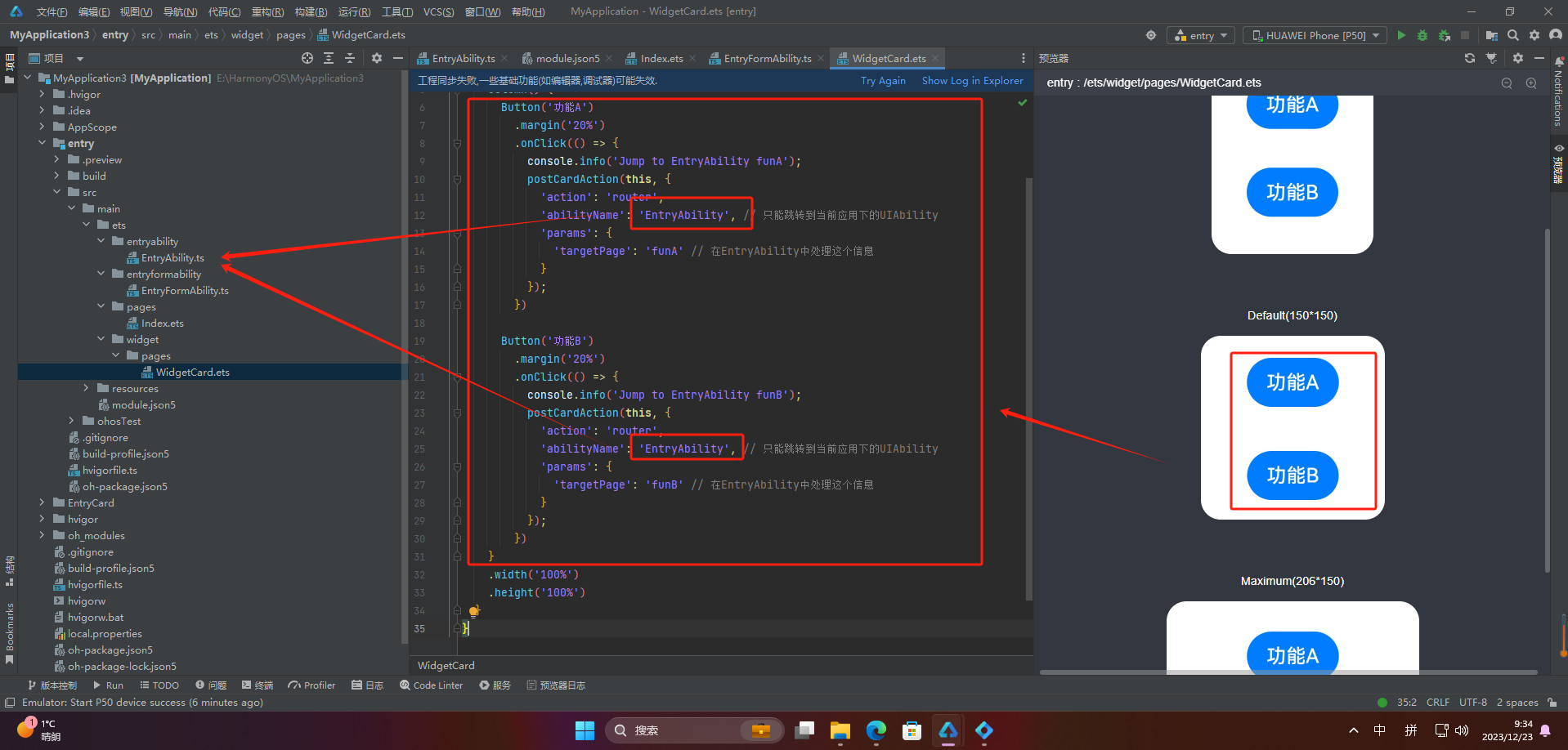
2、UIAbility接收参数
import UIAbility from '@ohos.app.ability.UIAbility';
import window from '@ohos.window';

let selectPage = "";
let currentWindowStage = null;

export default class CameraAbility extends UIAbility {
  // 如果UIAbility第一次启动,在收到Router事件后会触发onCreate生命周期回调
  onCreate(want, launchParam) {
    // 获取router事件中传递的targetPage参数
    console.info("onCreate want:" + JSON.stringify(want));
    if (want.parameters.params !== undefined) {
      let params = JSON.parse(want.parameters.params);
      console.info("onCreate router targetPage:" + params.targetPage);
      selectPage = params.targetPage;
    }
  }
  // 如果UIAbility已在后台运行,在收到Router事件后会触发onNewWant生命周期回调
  onNewWant(want, launchParam) {
    console.info("onNewWant want:" + JSON.stringify(want));
    if (want.parameters.params !== undefined) {
      let params = JSON.parse(want.parameters.params);
      console.info("onNewWant router targetPage:" + params.targetPage);
      selectPage = params.targetPage;
    }
    if (currentWindowStage != null) {
      this.onWindowStageCreate(currentWindowStage);
    }
  }

  onWindowStageCreate(windowStage: window.WindowStage) {
    let targetPage;
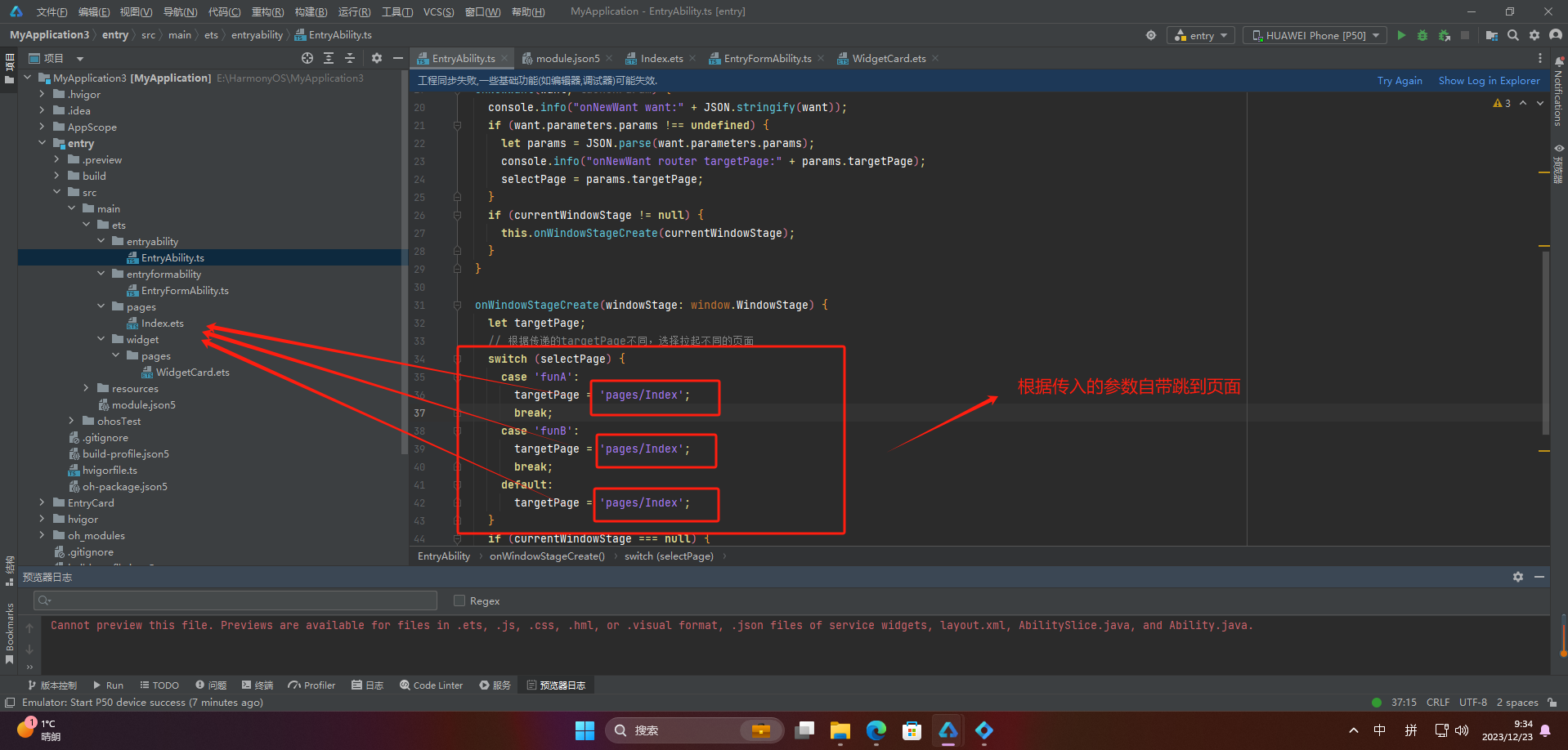
    // 根据传递的targetPage不同,选择拉起不同的页面
    switch (selectPage) {
      case 'funA':
        targetPage = 'pages/FunA';
        break;
      case 'funB':
        targetPage = 'pages/FunB';
        break;
      default:
        targetPage = 'pages/Index';
    }
    if (currentWindowStage === null) {
      currentWindowStage = windowStage;
    }
    windowStage.loadContent(targetPage, (err, data) => {
      if (err && err.code) {
        console.info('Failed to load the content. Cause: %{public}s', JSON.stringify(err));
        return;
      }
    });
  }
};
🔎3.使用call事件拉起指定UIAbility到后台
1、元服务界面
@Entry
@Component
struct WidgetCard {
  build() {
    Column() {
      Button('功能A')
        .margin('20%')
        .onClick(() => {
          console.info('call EntryAbility funA');
          postCardAction(this, {
            'action': 'call',
            'abilityName': 'EntryAbility', // 只能跳转到当前应用下的UIAbility
            'params': {
              'method': 'funA' // 在EntryAbility中调用的方法名
            }
          });
        })
       Button('功能B')
        .margin('20%')
        .onClick(() => {
          console.info('call EntryAbility funB');
          postCardAction(this, {
            'action': 'call',
            'abilityName': 'EntryAbility', // 只能跳转到当前应用下的UIAbility
            'params': {
              'method': 'funB', // 在EntryAbility中调用的方法名
              'num': 1 // 需要传递的其他参数
            }
          });
        })
    }
    .width('100%')
    .height('100%')
  }
}
2、UIAbility接收参数
import UIAbility from '@ohos.app.ability.UIAbility';

function FunACall(data) {
  // 获取call事件中传递的所有参数
  console.log('FunACall param:' + JSON.stringify(data.readString()));
  return null;
}
 function FunBCall(data) {
  console.log('FunACall param:' + JSON.stringify(data.readString()));
  return null;
}

export default class CameraAbility extends UIAbility {
  // 如果UIAbility第一次启动,在收到call事件后会触发onCreate生命周期回调
  onCreate(want, launchParam) {
      try {
          // 监听call事件所需的方法
          this.callee.on('funA', FunACall);
          this.callee.on('funB', FunBCall);
      } catch (error) {
          console.log('register failed with error. Cause: ' + JSON.stringify(error));
      }
  }

  // 进程退出时,解除监听
  onDestroy() {
      try {
          this.callee.off('funA');
          this.callee.off('funB');
      } catch (error) {
          console.log('register failed with error. Cause: ' + JSON.stringify(error));
      }
  }
};
不截图同上
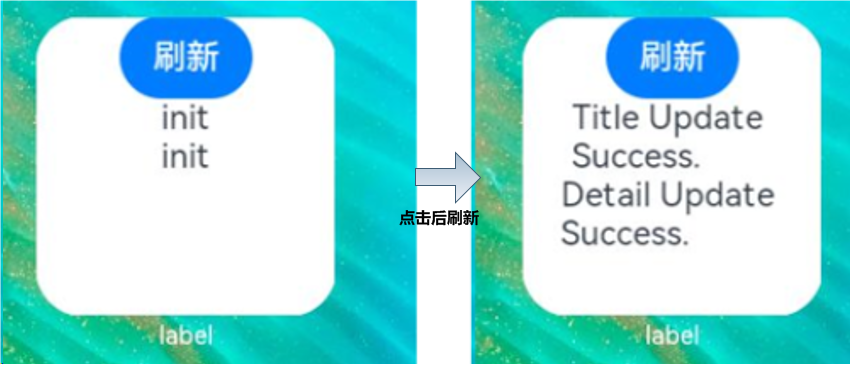
🔎4.通过message事件刷新卡片内容
1、卡片页面
let storage = new LocalStorage();

@Entry(storage)
@Component
struct WidgetCard {
  @LocalStorageProp('title') title: string = 'init';
  @LocalStorageProp('detail') detail: string = 'init';

  build() {
    Column() {
      Button('刷新')
        .onClick(() => {
          postCardAction(this, {
            'action': 'message',
            'params': {
              'msgTest': 'messageEvent'
            }
          });
        })
      Text(`${this.title}`)
      Text(`${this.detail}`)
    }
    .width('100%')
    .height('100%')
  }
}
2、卡片FormExtensionAbility
import formBindingData from '@ohos.app.form.formBindingData';
import FormExtensionAbility from '@ohos.app.form.FormExtensionAbility';
import formProvider from '@ohos.app.form.formProvider';

export default class EntryFormAbility extends FormExtensionAbility {
  onFormEvent(formId, message) {
    // Called when a specified message event defined by the form provider is triggered.
    console.info(`FormAbility onEvent, formId = ${formId}, message: ${JSON.stringify(message)}`);
    let formData = {
      'title': 'Title Update Success.', // 和卡片布局中对应
      'detail': 'Detail Update Success.', // 和卡片布局中对应
    };
    let formInfo = formBindingData.createFormBindingData(formData)
    formProvider.updateForm(formId, formInfo).then((data) => {
      console.info('FormAbility updateForm success.' + JSON.stringify(data));
    }).catch((error) => {
      console.error('FormAbility updateForm failed: ' + JSON.stringify(error));
    })
  }
}
🔎5.通过router或call事件刷新卡片内容
🦋5.1 router
1、卡片
let storage = new LocalStorage();

@Entry(storage)
@Component
struct WidgetCard {
  @LocalStorageProp('detail') detail: string = 'init';

  build() {
    Column() {
      Button('跳转')
        .margin('20%')
        .onClick(() => {
          console.info('postCardAction to EntryAbility');
          postCardAction(this, {
            'action': 'router',
            'abilityName': 'EntryAbility', // 只能跳转到当前应用下的UIAbility
            'params': {
              'detail': 'RouterFromCard'
            }
          });
        })
      Text(`${this.detail}`).margin('20%')
    }
    .width('100%')
    .height('100%')
  }
}
2、UIAbility
import UIAbility from '@ohos.app.ability.UIAbility';
import formBindingData from '@ohos.app.form.formBindingData';
import formProvider from '@ohos.app.form.formProvider';
import formInfo from '@ohos.app.form.formInfo';

export default class EntryAbility extends UIAbility {
  // 如果UIAbility第一次启动,在收到Router事件后会触发onCreate生命周期回调
  onCreate(want, launchParam) {
    console.info('Want:' + JSON.stringify(want));
    if (want.parameters[formInfo.FormParam.IDENTITY_KEY] !== undefined) {
      let curFormId = want.parameters[formInfo.FormParam.IDENTITY_KEY];
      let message = JSON.parse(want.parameters.params).detail;
      console.info(`UpdateForm formId: ${curFormId}, message: ${message}`);
      let formData = {
        "detail": message + ': onCreate UIAbility.', // 和卡片布局中对应
      };
      let formMsg = formBindingData.createFormBindingData(formData)
      formProvider.updateForm(curFormId, formMsg).then((data) => {
        console.info('updateForm success.' + JSON.stringify(data));
      }).catch((error) => {
        console.error('updateForm failed:' + JSON.stringify(error));
      })
    }
  }
  // 如果UIAbility已在后台运行,在收到Router事件后会触发onNewWant生命周期回调
  onNewWant(want, launchParam) {
    console.info('onNewWant Want:' + JSON.stringify(want));
    if (want.parameters[formInfo.FormParam.IDENTITY_KEY] !== undefined) {
      let curFormId = want.parameters[formInfo.FormParam.IDENTITY_KEY];
      let message = JSON.parse(want.parameters.params).detail;
      console.info(`UpdateForm formId: ${curFormId}, message: ${message}`);
      let formData = {
        "detail": message + ': onNewWant UIAbility.', // 和卡片布局中对应
      };
      let formMsg = formBindingData.createFormBindingData(formData)
      formProvider.updateForm(curFormId, formMsg).then((data) => {
        console.info('updateForm success.' + JSON.stringify(data));
      }).catch((error) => {
        console.error('updateForm failed:' + JSON.stringify(error));
      })
    }
  }

  ...
}
🦋5.2 call
1、在使用postCardAction接口的call事件时,需要在FormExtensionAbility中的onAddForm生命周期回调中更新formId。
import formBindingData from '@ohos.app.form.formBindingData';
import FormExtensionAbility from '@ohos.app.form.FormExtensionAbility';

export default class EntryFormAbility extends FormExtensionAbility {
  onAddForm(want) {
   let formId = want.parameters["ohos.extra.param.key.form_identity"];
   let dataObj1 = {
     "formId": formId
   };
   let obj1 = formBindingData.createFormBindingData(dataObj1);
   return obj1;
 }

 ...
};
2、卡片界面
let storage = new LocalStorage();

@Entry(storage)
@Component
struct WidgetCard {
  @LocalStorageProp('detail') detail: string = 'init';
  @LocalStorageProp('formId') formId: string = '0';

  build() {
    Column() {
      Button('拉至后台')
        .margin('20%')
        .onClick(() => {
          console.info('postCardAction to EntryAbility');
          postCardAction(this, {
            'action': 'call',
            'abilityName': 'EntryAbility', // 只能跳转到当前应用下的UIAbility
            'params': {
              'method': 'funA',
              'formId': this.formId,
              'detail': 'CallFromCard'
            }
          });
        })
      Text(`${this.detail}`).margin('20%')
    }
    .width('100%')
    .height('100%')
  }
}
let storage = new LocalStorage();

@Entry(storage)
@Component
struct WidgetCard {
  @LocalStorageProp('detail') detail: string = 'init';
  @LocalStorageProp('formId') formId: string = '0';

  build() {
    Column() {
      Button('拉至后台')
        .margin('20%')
        .onClick(() => {
          console.info('postCardAction to EntryAbility');
          postCardAction(this, {
            'action': 'call',
            'abilityName': 'EntryAbility', // 只能跳转到当前应用下的UIAbility
            'params': {
              'method': 'funA',
              'formId': this.formId,
              'detail': 'CallFromCard'
            }
          });
        })
      Text(`${this.detail}`).margin('20%')
    }
    .width('100%')
    .height('100%')
  }
}
3、UIAbility界面
import UIAbility from '@ohos.app.ability.UIAbility';
import formBindingData from '@ohos.app.form.formBindingData';
import formProvider from '@ohos.app.form.formProvider';
import formInfo from '@ohos.app.form.formInfo';
const MSG_SEND_METHOD: string = 'funA'

// 在收到call事件后会触发callee监听的方法
function FunACall(data) {
  // 获取call事件中传递的所有参数
  let params = JSON.parse(data.readString())
  if (params.formId !== undefined) {
    let curFormId = params.formId;
    let message = params.detail;
    console.info(`UpdateForm formId: ${curFormId}, message: ${message}`);
    let formData = {
      "detail": message
    };
    let formMsg = formBindingData.createFormBindingData(formData)
    formProvider.updateForm(curFormId, formMsg).then((data) => {
      console.info('updateForm success.' + JSON.stringify(data));
    }).catch((error) => {
      console.error('updateForm failed:' + JSON.stringify(error));
    })
  }
  return null;
}
export default class EntryAbility extends UIAbility {
  // 如果UIAbility第一次启动,call事件后会触发onCreate生命周期回调
  onCreate(want, launchParam) {
    console.info('Want:' + JSON.stringify(want));
    try {
       // 监听call事件所需的方法
      this.callee.on(MSG_SEND_METHOD, FunACall);
    } catch (error) {
      console.log(`${MSG_SEND_METHOD} register failed with error ${JSON.stringify(error)}`)
    }
  }
  ...
}
🚀感谢:给读者的一封信
亲爱的读者,
我在这篇文章中投入了大量的心血和时间,希望为您提供有价值的内容。这篇文章包含了深入的研究和个人经验,我相信这些信息对您非常有帮助。
如果您觉得这篇文章对您有所帮助,我诚恳地请求您考虑赞赏1元钱的支持。这个金额不会对您的财务状况造成负担,但它会对我继续创作高质量的内容产生积极的影响。
我之所以写这篇文章,是因为我热爱分享有用的知识和见解。您的支持将帮助我继续这个使命,也鼓励我花更多的时间和精力创作更多有价值的内容。
如果您愿意支持我的创作,请扫描下面二维码,您的支持将不胜感激。同时,如果您有任何反馈或建议,也欢迎与我分享。

再次感谢您的阅读和支持!
最诚挚的问候, “愚公搬代码”

- 点赞
- 收藏
- 关注作者
评论(0)