【图像增强】基于matlab可见边缘梯度比率图像增强【含Matlab源码 1404期】

【摘要】
一、获取代码方式
获取代码方式1: 完整代码已上传我的资源:【图像增强】基于matlab可见边缘梯度比率图像增强【含Matlab源码 1404期】
获取代码方式2: 通过紫极神光博客主页开通CSDN会...
一、获取代码方式
获取代码方式1:
完整代码已上传我的资源:【图像增强】基于matlab可见边缘梯度比率图像增强【含Matlab源码 1404期】
获取代码方式2:
通过紫极神光博客主页开通CSDN会员,凭支付凭证,私信博主,可获得此代码。
获取代码方式3:
通过订阅紫极神光博客付费专栏,凭支付凭证,私信博主,可获得此代码。
备注:开通CSDN会员,仅只能免费获得1份代码(有效期为开通日起,三天内有效);
订阅紫极神光博客付费专栏,可免费获得2份代码(有效期为订阅日起,三天内有效);
二、部分源代码
%%%% Cleaning
clc
clear all
close all

%%%% Images reading: the input 2 images must be grayscale

NameOri='Original.pgm';
%NameResto='Restored.pgm';
NameResto='Restored2.pgm';
%NameResto='Restored3.pgm';
%NameResto='Restored4.pgm';
%NameResto='Restored5.pgm';


% if the input image is a color image, use following line
% I1=double(rgb2gray(uint8(I1)));


R1=imread(NameResto);
R1=double(R1);
% if the input image is a color image, use following line
% R1=double(rgb2gray(uint8(R1)));

%%%% Figure 1
figure(1)
colormap gray
subplot(1,2,1)
imagesc(I1)
axis image
title('Original')
subplot(1,2,2)
imagesc(R1)
axis image
title('Restored')

%%%% Sobel Gradient
Sy = double([1 2 1;0 0 0;-1 -2 -1]);


Sx = double([1 0 -1; 2 0 -2; 1 0 -1]);
GIx = imfilter(I1,Sx,'symmetric');
GRx1 = imfilter(R1,Sx,'symmetric');

GI=sqrt((GIx.^2)+(GIy.^2));
GR1=sqrt((GRx1.^2)+(GRy1.^2));

minGI=min(GI(:));
maxGI=max(GI(:));

%%%% Figure 2
figure(2)
colormap gray
subplot(1,2,1)
imagesc(GI,[minGI maxGI]);
title(['Gradients of the original image']);
axis image
colorbar
subplot(1,2,2)
imagesc(GR1,[minGI maxGI]);
title(['Gradients of the restored image']);
axis image
colorbar

%%%% Contrast Computation at 5%
tic
[C1 Crr1]=functionContrastAt5PerCent(R1);
[Ci Crri]=functionContrastAt5PerCent(I1);
toc

minCrri=min(Crri(:));
maxCrri=max(Crri(:));

%%%% Figure 3
figure(3)
colormap gray
subplot(1,2,1)
imagesc(Crri,[minCrri  maxCrri]);
axis image
title(['Visible edge in the original image']);
colorbar
subplot(1,2,2)
imagesc(Crr1,[minCrri  maxCrri]);
axis image
title(['Visible edge in the restored image']);
colorbar

%%%% Visible Gradients Ratio
Cratio1=zeros(nl,nc);
Cratio1(Crr1>0)=GR1(Crr1>0)./GI(Crr1>0);

rmin=1;
rmax=10;

%%%% Figure 4
figure(4)
imagesc(Cratio1,[rmin rmax]);
axis image
title(['Visible gradients ratio between ',num2str(rmin), ' and ',num2str(rmax)]);
colormap jet
colorbar

%%%% Descriptor computation

% Rate of new visible edges


% Number of saturated pixels after restoration
ns1=sum(R1(:)==255 |R1(:)==0);
ns1=ns1/(nl*nc);

% Restoration quality (geometric mean ratios of visibility level)
XX=log(Cratio1);
r1=exp((1/(whitePixels1))*nansum(XX(isfinite(XX))));

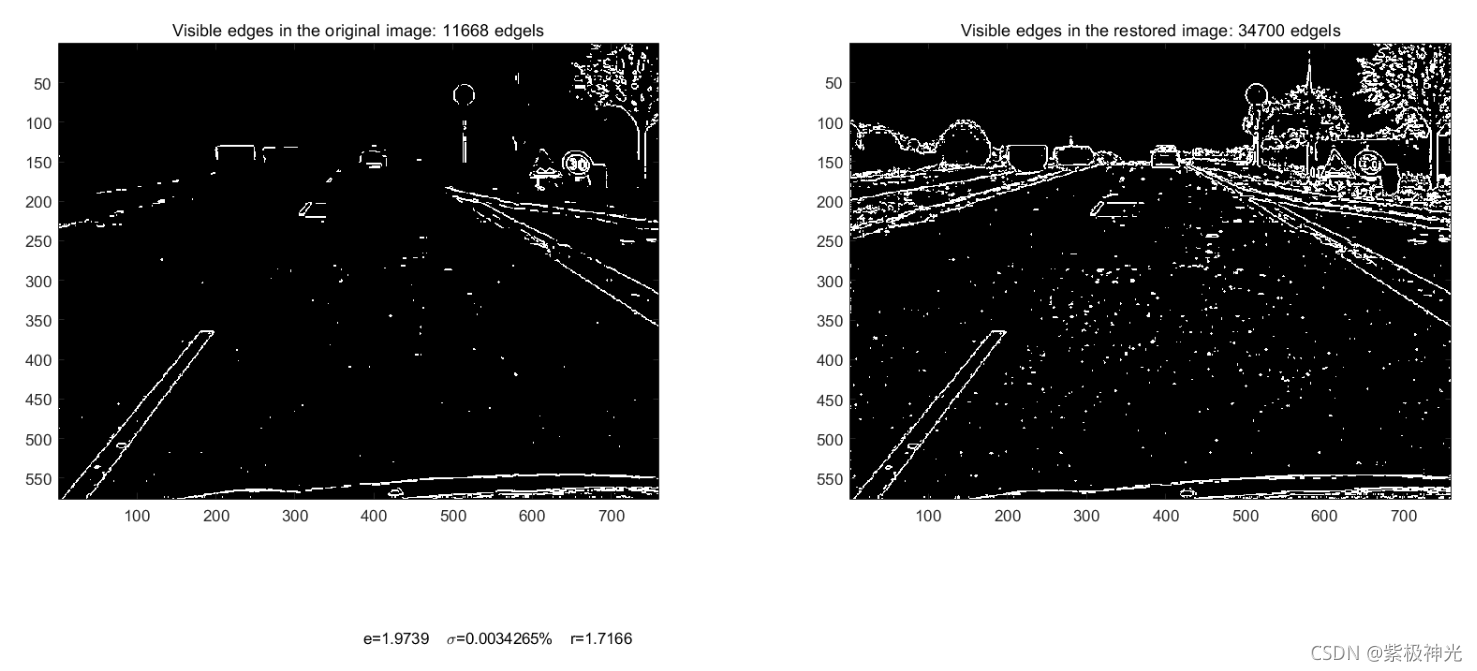
%%%% Figure 5: Final result with the visible edges at 5% and descriptors
figure(5)
subplot(1,2,1);
colormap gray
imagesc(Ci);
axis image
title(['Visible edges in the original image: ',num2str( whitePixelsi), ' edgels'])
subplot(1,2,2);
colormap gray
imagesc(C1);
axis image
title(['Visible edges in the restored image: ',num2str( whitePixels1), ' edgels'])

axes('position',[0,0,1,1],'visible','off');
text(0.3,0.1,['e=',num2str(e1),'    {\sigma}=',num2str(ns1*100),'%','    r=', num2str(r1),' ' ])
三、运行结果
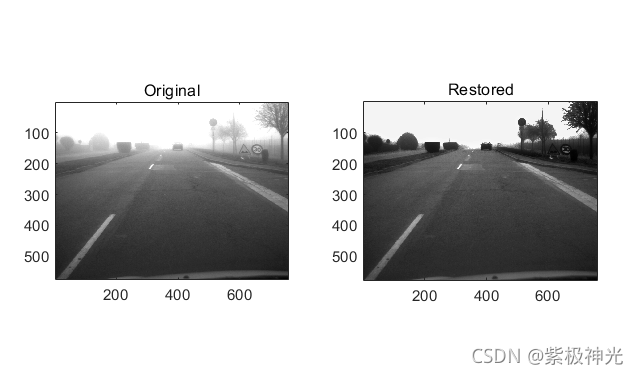
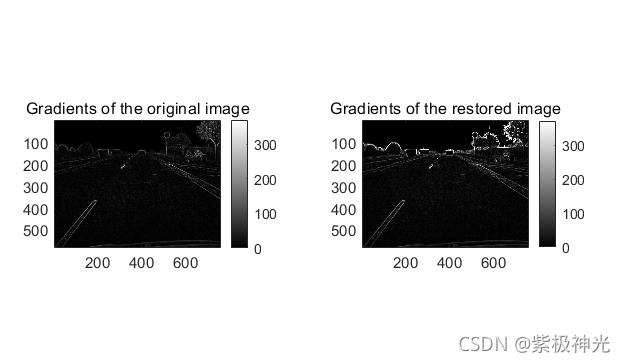
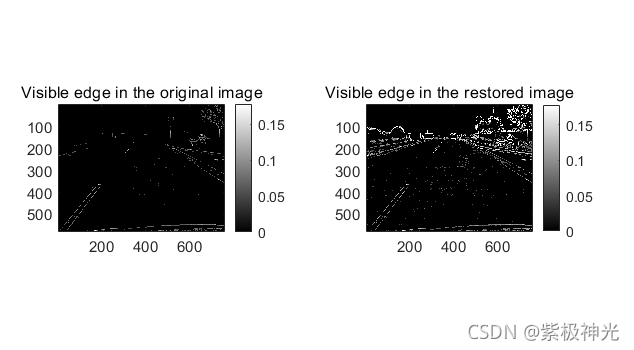
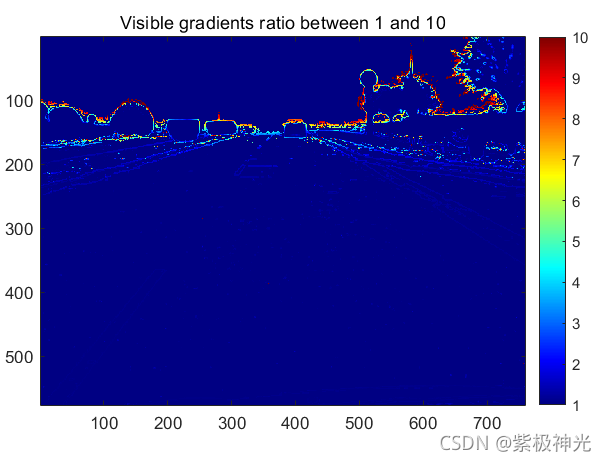
四、matlab版本及参考文献
1 matlab版本
2014a
2 参考文献
[1] 蔡利梅.MATLAB图像处理——理论、算法与实例分析[M].清华大学出版社,2020.
[2]杨丹,赵海滨,龙哲.MATLAB图像处理实例详解[M].清华大学出版社,2013.
[3]周品.MATLAB图像处理与图形用户界面设计[M].清华大学出版社,2013.
[4]刘成龙.精通MATLAB图像处理[M].清华大学出版社,2015.
文章来源: qq912100926.blog.csdn.net,作者:海神之光,版权归原作者所有,如需转载,请联系作者。
原文链接:qq912100926.blog.csdn.net/article/details/120810480

【版权声明】本文为华为云社区用户转载文章,如果您发现本社区中有涉嫌抄袭的内容,欢迎发送邮件进行举报,并提供相关证据,一经查实,本社区将立刻删除涉嫌侵权内容,举报邮箱:
cloudbbs@huaweicloud.com
- 点赞
- 收藏
- 关注作者
评论(0)