SpringBoot 整合 Thymeleaf

【摘要】
jsp输出页面是通过 response.getWriter().write 去一点一点写会给浏览器,效率低,我们也发现了这个问题,于是,在 SpringBoot 中提倡使用一种新的视图解析,他就是 Thy...
jsp输出页面是通过 response.getWriter().write 去一点一点写会给浏览器,效率低,我们也发现了这个问题,于是,在 SpringBoot 中提倡使用一种新的视图解析,他就是 Thymeleaf,他是把整个 HTML 页面直接返回,效率高,使用方式就是先在 pom.xml 中引入 spring-boot-starter-thymeleaf 坐标,然后配置下视图解析器,和 jsp 的视图解析器类似,之后就可以使用了,非常简单
pom.xml
<parent>
    <groupId>org.springframework.boot</groupId>
    <artifactId>spring-boot-starter-parent</artifactId>
    <version>2.6.6</version>
    <relativePath/>
</parent>
<dependencies>
    <dependency>
        <groupId>org.springframework.boot</groupId>
        <artifactId>spring-boot-starter-web</artifactId>
    </dependency>

    <dependency>
        <groupId>org.projectlombok</groupId>
        <artifactId>lombok</artifactId>
        <optional>true</optional>
    </dependency>
    <dependency>
        <groupId>org.springframework.boot</groupId>
        <artifactId>spring-boot-starter-test</artifactId>
        <scope>test</scope>
    </dependency>

    <dependency>
        <groupId>org.springframework.boot</groupId>
        <artifactId>spring-boot-starter-thymeleaf</artifactId>
    </dependency>
</dependencies>
- 1
- 2
- 3
- 4
- 5
- 6
- 7
- 8
- 9
- 10
- 11
- 12
- 13
- 14
- 15
- 16
- 17
- 18
- 19
- 20
- 21
- 22
- 23
- 24
- 25
- 26
- 27
- 28
application.yml
server:
  port: 8080
spring:
  thymeleaf:
    prefix: classpath:/templates/
    suffix: .html
    mode: HTML5
    encoding: UTF-8
- 1
- 2
- 3
- 4
- 5
- 6
- 7
- 8
IndexController
@Controller
@RequestMapping("/index")
public class IndexController {

    @GetMapping("/index")
    public String index(){
        System.out.println("首页");
        return "index";
    }
}
- 1
- 2
- 3
- 4
- 5
- 6
- 7
- 8
- 9
- 10
index.html
<!DOCTYPE html>
<html lang="en">
<head>
    <meta charset="UTF-8">
    <title>Title</title>
</head>
<body>
<h1>Hello Thymeleaf</h1>
</body>
</html>
- 1
- 2
- 3
- 4
- 5
- 6
- 7
- 8
- 9
- 10
结果

数据传递
去index时,添加了一个User集合,怎么获取呢
@Controller
@RequestMapping("/index")
public class IndexController {

    @GetMapping("/index")
    public String index(Model model){
        System.out.println("首页");
        List<User> users = new ArrayList<>();
        users.add(new User(1,"小刘",12));
        users.add(new User(2,"张三",23));
        users.add(new User(3,"王五",10));
        model.addAttribute("users",users);
        return "index";
    }
}
- 1
- 2
- 3
- 4
- 5
- 6
- 7
- 8
- 9
- 10
- 11
- 12
- 13
- 14
- 15
index.html
<!DOCTYPE html>
<html xmlns:th = "http://www.thymeleaf.org"></html>
<html lang="en">
<head>
    <meta charset="UTF-8">
    <title>Title</title>
</head>
<body>
<h1>Hello Thymeleaf</h1>
<table>
    <tr>
        <th>id</th>
        <th>name</th>
        <th>age</th>
    </tr>
    <tr th:each="user:${users}">
        <td th:text="${user.id}"></td>
        <td th:text="${user.name}"></td>
        <td th:text="${user.age}"></td>
    </tr>
</table>
</body>
</html>
- 1
- 2
- 3
- 4
- 5
- 6
- 7
- 8
- 9
- 10
- 11
- 12
- 13
- 14
- 15
- 16
- 17
- 18
- 19
- 20
- 21
- 22
- 23
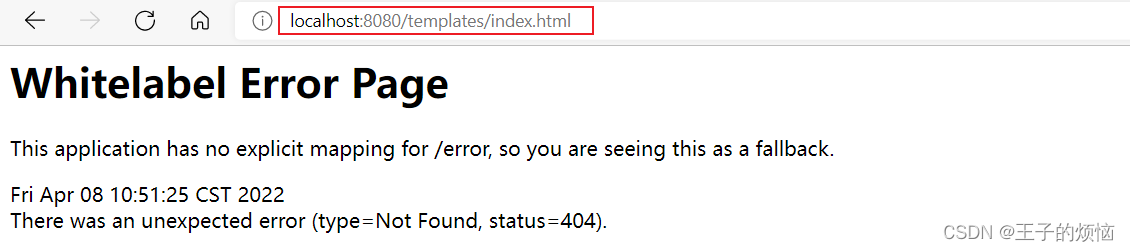
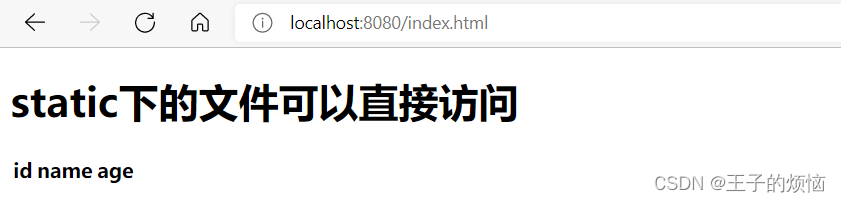
注意:如果你的资源希望通过地址栏直接进行访问,那么,你可以新建一个 static 包,这是 spring boot 专门放静态资源的,约定大于配置,否则必须通过 controller 控制器映射才可以访问静态资源

thymeleaf下
static下
文章来源: blog.csdn.net,作者:周棋洛ყ ᥱ ᥉,版权归原作者所有,如需转载,请联系作者。
原文链接:blog.csdn.net/m0_53321320/article/details/124034743

【版权声明】本文为华为云社区用户转载文章,如果您发现本社区中有涉嫌抄袭的内容,欢迎发送邮件进行举报,并提供相关证据,一经查实,本社区将立刻删除涉嫌侵权内容,举报邮箱:
cloudbbs@huaweicloud.com
- 点赞
- 收藏
- 关注作者
评论(0)