(精华)2020年8月22日 微服务 Ocelot的简单使用(.net core版)

【摘要】
一、创建demo项目
1.新建webapi项目,命名为“DemoProject”,去掉HTTPS勾选
using Microsoft.AspNetCore.Mvc;
using System.Coll...
一、创建demo项目
1.新建webapi项目,命名为“DemoProject”,去掉HTTPS勾选
using Microsoft.AspNetCore.Mvc;
using System.Collections.Generic;

namespace DemoProject.Controllers
{
    [Route("api/[controller]/[action]")]
    [ApiController]
    public class DefaultController : ControllerBase
    {
        static List<Student> list = new List<Student>() {
             new Student(){ ID = "001", StudentName = "学生1", StudentAge = 16 },
             new Student(){ ID = "002", StudentName = "学生2", StudentAge = 18 },
             new Student(){ ID = "003", StudentName = "学生3", StudentAge = 17 }
         };

        [HttpGet]
        public List<Student> GetList()
        {
            return list;
        }

        [HttpGet]
        public Student GetModel(string id)
        {
            return list.Find(t => t.ID == id);
        }
    }

    public class Student
    {
        public string ID { get; set; }
        public string StudentName { get; set; }
        public int StudentAge { get; set; }
    }
}
- 1
- 2
- 3
- 4
- 5
- 6
- 7
- 8
- 9
- 10
- 11
- 12
- 13
- 14
- 15
- 16
- 17
- 18
- 19
- 20
- 21
- 22
- 23
- 24
- 25
- 26
- 27
- 28
- 29
- 30
- 31
- 32
- 33
- 34
- 35
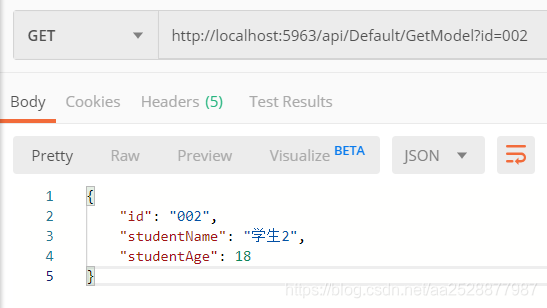
2.通过VS启动,并且保证能正常访问

二、创建Ocelot项目
1.新建webapi项目,命名为“OcelotProject”,去掉HTTPS勾选,不需要Controller
2.打开程序包管理器控制台,执行命令:Install-Package Ocelot

3.在项目根目录下,新建配置文件“ocelot.json”,填写为你自己的“DemoProject”的端口号
{
  "ReRoutes": [
    {
      "DownstreamPathTemplate": "/api/Default/GetList",
      "DownstreamScheme": "http",
      "DownstreamHostAndPorts": [
        {
          "Host": "localhost",
          "Port": 5963
        }
      ],
      "UpstreamPathTemplate": "/GetList",
      "UpstreamHttpMethod": [ "Get" ]
    },
    {
      "DownstreamPathTemplate": "/api/Default/GetModel?id={s1}",
      "DownstreamScheme": "http",
      "DownstreamHostAndPorts": [
        {
          "Host": "localhost",
          "Port": 5963
        }
      ],
      "UpstreamPathTemplate": "/GetModel?id={s1}",
      "UpstreamHttpMethod": [ "Get" ]
    }
  ]
}
- 1
- 2
- 3
- 4
- 5
- 6
- 7
- 8
- 9
- 10
- 11
- 12
- 13
- 14
- 15
- 16
- 17
- 18
- 19
- 20
- 21
- 22
- 23
- 24
- 25
- 26
- 27
- 28
4.在Program.cs的CreateHostBuilder中加入
.ConfigureAppConfiguration(conf => {
    conf.AddJsonFile("ocelot.json", false, true);
})
- 1
- 2
- 3

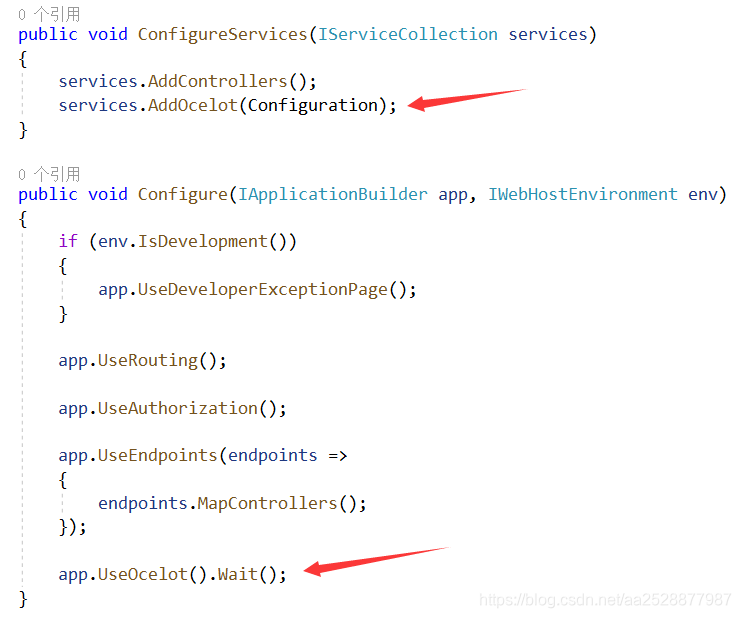
5.找到Startup.cs
在ConfigureServices中加入:
services.AddOcelot(Configuration);
- 1
在Configure中加入:
app.UseOcelot().Wait();
- 1
三、请求
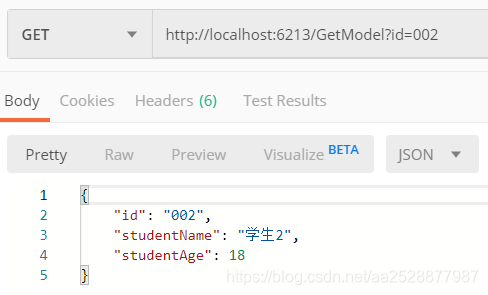
通过VS启动“OcelotProject”,由于配置中对外的路由为“/GetList”,所以访问地址为:http://ip:port/GetList

GetModel的访问地址为:http://ip:port/GetModel?id=002
代码:https://files.cnblogs.com/files/shousiji/OcelotDemo.rar
文章来源: codeboy.blog.csdn.net,作者:愚公搬代码,版权归原作者所有,如需转载,请联系作者。
原文链接:codeboy.blog.csdn.net/article/details/108150070

【版权声明】本文为华为云社区用户转载文章,如果您发现本社区中有涉嫌抄袭的内容,欢迎发送邮件进行举报,并提供相关证据,一经查实,本社区将立刻删除涉嫌侵权内容,举报邮箱:
cloudbbs@huaweicloud.com
- 点赞
- 收藏
- 关注作者
评论(0)