QCustomPlot使用心得二:轴范围调整,rescaleAxes 用法

【摘要】 官网图例https://www.qcustomplot.com/index.php/demos/simpledemo
QCustomPlot* customPlot = ui->customPlot_6; // 添加两个graph customPlot->addGraph(); customPlot->graph(0)->setPen(Q...
官网图例https://www.qcustomplot.com/index.php/demos/simpledemo
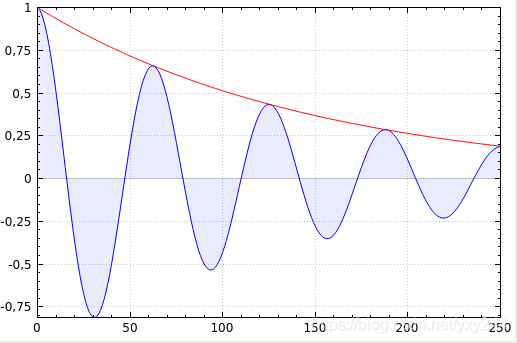
QCustomPlot* customPlot = ui->customPlot_6; // 添加两个graph customPlot->addGraph(); customPlot->graph(0)->setPen(QPen(Qt::blue)); // 第一条曲线颜色 customPlot->graph(0)->setBrush(QBrush(QColor(0, 0, 255, 20))); // 第一条曲线和0轴围成区域填充的颜色 customPlot->addGraph(); customPlot->graph(1)->setPen(QPen(Qt::red)); // 第二条曲线颜色 // 生成数据 QVector<double> x(251), y0(251), y1(251); for (int i=0; i<251; ++i) { x[i] = i; y0[i] = qExp(-i/150.0)*qCos(i/10.0); // 指数衰减的cos y1[i] = qExp(-i/150.0); // 衰减指数 } // 配置右侧和顶部轴显示刻度,但不显示标签: customPlot->xAxis2->setVisible(true); customPlot->xAxis2->setTickLabels(false); customPlot->yAxis2->setVisible(true); customPlot->yAxis2->setTickLabels(false); // 让左边和下边轴与上边和右边同步改变范围 connect(customPlot->xAxis, SIGNAL(rangeChanged(QCPRange)), customPlot->xAxis2, SLOT(setRange(QCPRange))); connect(customPlot->yAxis, SIGNAL(rangeChanged(QCPRange)), customPlot->yAxis2, SLOT(setRange(QCPRange))); // 设置数据点 customPlot->graph(0)->setData(x, y0); customPlot->graph(1)->setData(x, y1); // 让范围自行缩放,使图0完全适合于可见区域: customPlot->graph(0)->rescaleAxes(); // 图1也是一样自动调整范围,但只是放大范围(如果图1小于图0): customPlot->graph(1)->rescaleAxes(true); // 允许用户用鼠标拖动轴范围,用鼠标滚轮缩放,点击选择图形: customPlot->setInteractions(QCP::iRangeDrag | QCP::iRangeZoom | QCP::iSelectPlottables); customPlot->replot();
- 1
- 2
- 3
- 4
- 5
- 6
- 7
- 8
- 9
- 10
- 11
- 12
- 13
- 14
- 15
- 16
- 17
- 18
- 19
- 20
- 21
- 22
- 23
- 24
- 25
- 26
- 27
- 28
- 29
- 30
- 31
- 32
- 33
(1)上下轴,左右轴范围同步
利用rangeChanged信号传递轴范围QCPRange,范围改变时将xAxis的范围传给xAxis2,yAxis也是,就能实现轴范围同步了。
connect(customPlot->xAxis, SIGNAL(rangeChanged(QCPRange)), customPlot->xAxis2, SLOT(setRange(QCPRange)));
connect(customPlot->yAxis, SIGNAL(rangeChanged(QCPRange)), customPlot->yAxis2, SLOT(setRange(QCPRange)));
- 1
- 2
(2)自动调整范围,使数据全部可见。
调用rescaleAxes (bool onlyEnlarge = false)重新调整与此绘图表关联的键和值轴,以显示所有的数据
onlyEnlarge 默认false,表示范围可以缩小放大,如果为true表示只能放大,而不会缩小范围。
例如曲线:
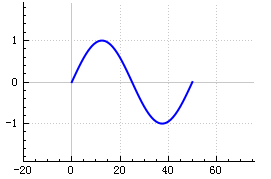
调用 customPlot->graph(0)->rescaleAxes();后范围被缩小了,曲线正好占满整个区域,但是调用customPlot->graph(0)->rescaleAxes(true)就不会有变化,因为区域不会缩小。
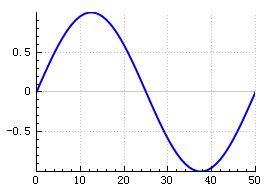
利用这点可以通过多次调用rescaleaxis来完整地显示多个graph的数据。让graph(0)自动缩放rescaleAxes(),在graph(0)范围的基础上rescaleAxes(true)只会扩大范围或不变而不缩小,这样最终能够显示graph(n)所有的数据
// 让范围自行缩放,使图0完全适合于可见区域:
customPlot->graph(0)->rescaleAxes();
// 图1也是一样自动调整范围,但只是放大或不变范围
customPlot->graph(1)->rescaleAxes(true);
// 图2也是一样自动调整范围,但只是放大或不变范围
customPlot->graph(2)->rescaleAxes(true);
// 图3也是一样自动调整范围,但只是放大或不变范围
customPlot->graph(2)->rescaleAxes(true);
。。。
- 1
- 2
- 3
- 4
- 5
- 6
- 7
- 8
- 9
文章来源: blog.csdn.net,作者:果果小师弟,版权归原作者所有,如需转载,请联系作者。
原文链接:blog.csdn.net/qq_39400113/article/details/114998180

【版权声明】本文为华为云社区用户转载文章,如果您发现本社区中有涉嫌抄袭的内容,欢迎发送邮件进行举报,并提供相关证据,一经查实,本社区将立刻删除涉嫌侵权内容,举报邮箱:
cloudbbs@huaweicloud.com
- 点赞
- 收藏
- 关注作者
评论(0)