SpringCloud学习笔记(四、注册数据微服务)

【摘要】 创建子项目
pom.xml:
spring-cloud-starter-netflix-eureka-client 表示这是个 eureka 客户端。 spring-boot-starter-web: 表示这是个web服务,会提供控制层
<?xml version="1.0" encoding="UTF-8"?>
<project xmlns="http:/...
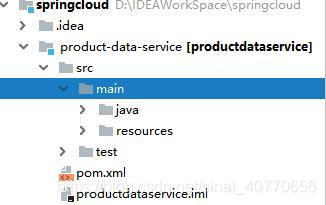
创建子项目
pom.xml:
spring-cloud-starter-netflix-eureka-client 表示这是个 eureka 客户端。
spring-boot-starter-web: 表示这是个web服务,会提供控制层
<?xml version="1.0" encoding="UTF-8"?>

<project xmlns="http://maven.apache.org/POM/4.0.0" xmlns:xsi="http://www.w3.org/2001/XMLSchema-instance" xsi:schemaLocation="http://maven.apache.org/POM/4.0.0 http://maven.apache.org/xsd/maven-4.0.0.xsd"> <parent> <artifactId>springcloud</artifactId> <groupId>edu.hpu.springcloud</groupId> <version>1.0-SNAPSHOT</version> </parent> <modelVersion>4.0.0</modelVersion> <artifactId>product-data-service</artifactId> <name>product-data-service</name> <!-- FIXME change it to the project's website --> <url>http://www.example.com</url> <properties> <project.build.sourceEncoding>UTF-8</project.build.sourceEncoding> <maven.compiler.source>1.8</maven.compiler.source> <maven.compiler.target>1.8</maven.compiler.target> </properties> <dependencies> <dependency> <groupId>org.springframework.cloud</groupId> <artifactId>spring-cloud-starter-netflix-eureka-client</artifactId> </dependency> <dependency> <groupId>org.springframework.boot</groupId> <artifactId>spring-boot-starter-web</artifactId> </dependency> </dependencies>


</project>
- 1
- 2
- 3
- 4
- 5
- 6
- 7
- 8
- 9
- 10
- 11
- 12
- 13
- 14
- 15
- 16
- 17
- 18
- 19
- 20
- 21
- 22
- 23
- 24
- 25
- 26
- 27
- 28
- 29
- 30
- 31
- 32
- 33
- 34
- 35
- 36
- 37
实体类Product:
package edu.hpu.springcloud.pojo;

public class Product { private int id; private String name; private int price; public int getId() { return id; } public void setId(int id) { this.id = id; } public String getName() { return name; } public void setName(String name) { this.name = name; } public int getPrice() { return price; } public void setPrice(int price) { this.price = price; } public Product(int id, String name, int price) { this.id = id; this.name = name; this.price = price; } public Product() { }
}
- 1
- 2
- 3
- 4
- 5
- 6
- 7
- 8
- 9
- 10
- 11
- 12
- 13
- 14
- 15
- 16
- 17
- 18
- 19
- 20
- 21
- 22
- 23
- 24
- 25
- 26
- 27
- 28
- 29
- 30
- 31
- 32
- 33
- 34
- 35
- 36
- 37
- 38
- 39
- 40
服务层ProductService:
这里把 端口号 放进了产品信息里。 这个数据服务会做成集群,那么访问者为了分辨到底是从哪个数据微服务取的数据,就需要提供个端口号,才能意识到是从不同的微服务得到的数据。
package edu.hpu.springcloud.pojo;

public class Product { private int id; private String name; private int price; public int getId() { return id; } public void setId(int id) { this.id = id; } public String getName() { return name; } public void setName(String name) { this.name = name; } public int getPrice() { return price; } public void setPrice(int price) { this.price = price; } public Product(int id, String name, int price) { this.id = id; this.name = name; this.price = price; } public Product() { }
}
- 1
- 2
- 3
- 4
- 5
- 6
- 7
- 8
- 9
- 10
- 11
- 12
- 13
- 14
- 15
- 16
- 17
- 18
- 19
- 20
- 21
- 22
- 23
- 24
- 25
- 26
- 27
- 28
- 29
- 30
- 31
- 32
- 33
- 34
- 35
- 36
- 37
- 38
- 39
- 40
控制层ProductController:
把 Product 集合转换成 json 数组。
package edu.hpu.springcloud.controller;

import edu.hpu.springcloud.pojo.Product;
import edu.hpu.springcloud.service.ProductService;
import org.springframework.beans.factory.annotation.Autowired;
import org.springframework.web.bind.annotation.RequestMapping;
import org.springframework.web.bind.annotation.RestController;

import java.util.List;

@RestController
public class ProductController { @Autowired private ProductService productService; @RequestMapping("/products") public Object products() { List<Product> ps = productService.listProducts(); return ps; }
}
- 1
- 2
- 3
- 4
- 5
- 6
- 7
- 8
- 9
- 10
- 11
- 12
- 13
- 14
- 15
- 16
- 17
- 18
- 19
- 20
- 21
启动类ProductDataServiceApplication:
这里自定义了一个Future类,五秒内用户没有选择端口,则自动选用8001。
package edu.hpu.springcloud;

import cn.hutool.core.convert.Convert;
import cn.hutool.core.thread.ThreadUtil;
import cn.hutool.core.util.NetUtil;
import cn.hutool.core.util.NumberUtil;
import org.springframework.boot.autoconfigure.SpringBootApplication;
import org.springframework.boot.builder.SpringApplicationBuilder;
import org.springframework.cloud.netflix.eureka.EnableEurekaClient;

import java.util.Scanner;
import java.util.concurrent.ExecutionException;
import java.util.concurrent.Future;
import java.util.concurrent.TimeUnit;
import java.util.concurrent.TimeoutException;

@SpringBootApplication
@EnableEurekaClient
public class ProductDataServiceApplication { public static void main(String[] args) { int port = 0; int defaultPort = 8002; Future<Integer> future = ThreadUtil.execAsync(() ->{ int p = 0; System.out.println("请于5秒钟内输入端口号, 推荐  8001 、 8002  或者  8003,超过5秒将默认使用 " + defaultPort); Scanner scanner = new Scanner(System.in); while(true) { String strPort = scanner.nextLine(); if(!NumberUtil.isInteger(strPort)) { System.err.println("只能是数字"); continue; } else { p = Convert.toInt(strPort); scanner.close(); break; } } return p; }); try{ port=future.get(5, TimeUnit.SECONDS); } catch (InterruptedException | ExecutionException | TimeoutException e){ port = defaultPort; } if(!NetUtil.isUsableLocalPort(port)) { System.err.printf("端口%d被占用了,无法启动%n", port ); System.exit(1); } new SpringApplicationBuilder(ProductDataServiceApplication.class).properties("server.port=" + port).run(args); }
}
- 1
- 2
- 3
- 4
- 5
- 6
- 7
- 8
- 9
- 10
- 11
- 12
- 13
- 14
- 15
- 16
- 17
- 18
- 19
- 20
- 21
- 22
- 23
- 24
- 25
- 26
- 27
- 28
- 29
- 30
- 31
- 32
- 33
- 34
- 35
- 36
- 37
- 38
- 39
- 40
- 41
- 42
- 43
- 44
- 45
- 46
- 47
- 48
- 49
- 50
- 51
- 52
- 53
- 54
- 55
- 56
配置application.yml:
#   server:
#   port: 因为会启动多个 product-data-service, 所以端口号由用户自动设置,推荐 8001,8002,8003

spring:
  application: name: product-data-service
eureka:
  client: serviceUrl: defaultZone: http://localhost:8761/eureka/
- 1
- 2
- 3
- 4
- 5
- 6
- 7
- 8
- 9
- 10
启动并访问
启动ProductDataServiceApplication,

第一次出了点问题:
com.sun.jersey.api.client.ClientHandlerException: java.net.SocketTimeoutException: Read timed out
- 1
这个好像是配置的问题,我没有查出来,再跑一遍,结果就没问题了,但是在注册中心还是有显示,目前没有搞清楚到底什么情况。
访问注册中心:http://localhost:8761/
 访问端口为8001服务:http://127.0.0.1:8001/products
 再跑一下启动类,这次选择8002:
注册中心:

http://127.0.0.1:8002/products

参考:
【1】、http://how2j.cn/k/springcloud/springcloud-eureka-client/2039.html#nowhere
文章来源: blog.csdn.net,作者:三分恶,版权归原作者所有,如需转载,请联系作者。
原文链接:blog.csdn.net/sinat_40770656/article/details/96012233

【版权声明】本文为华为云社区用户转载文章,如果您发现本社区中有涉嫌抄袭的内容,欢迎发送邮件进行举报,并提供相关证据,一经查实,本社区将立刻删除涉嫌侵权内容,举报邮箱:
cloudbbs@huaweicloud.com
- 点赞
- 收藏
- 关注作者
评论(0)